St. Louis · Kansas City


MCP, Explained for People Who Don’t Care About Acronyms
If you have sat through an AI pitch this year, you have probably heard someone say “MCP.” It stands for Model Context Protocol, which tells you almost nothing. The idea behind it, though, is simple and it matters a lot.
MCP is how AI gets to see your business. It is also, when it is built correctly, how you make sure AI can only look and never touch.
The Problem: AI is Smart but Blind
A general-purpose AI assistant knows a lot about the world. It knows nothing about your business. Ask it which clients have agreements renewing next month, and it has no idea. That answer lives in your PSA, your CRM, and your accounting system, and the AI cannot see any of them.
Many people work around this by copying and pasting. They export a report, drop it into a chat window, and ask the AI to make sense of it. That works once, but the data is out of date the moment it is pasted, and sensitive information ends up in places it probably should not be.
The traditional fix is custom integration work: a developer writes code to connect one AI tool to one system. Then another system. Then another. Every connection is built differently, maintained separately, and breaks on its own schedule.
What MCP Actually is
Think about the charging cables in your desk drawer. For years, every device had its own plug. Then USB-C came along, and one cable started working with almost everything.
MCP does the same thing for AI. It is an open standard that gives AI one consistent way to connect to business systems. Instead of building a custom bridge for every tool, each system is described once, in a format any MCP-compatible AI can understand.
“Open” matters here. MCP is not owned by a single vendor, so you are not locked into one AI product to use it. As AI tools improve, the connections to your systems can stay in place.
For you, that means three practical things:
- Faster setup. Connecting new systems takes less custom work, which is a big part of why most rollouts go live in six to ten weeks.
- Less fragility. One standard is easier to maintain than a dozen one-off integrations.
- More control. Because every connection goes through the same layer, you can set the rules for what AI can and cannot do in one place.
How it Fits Together
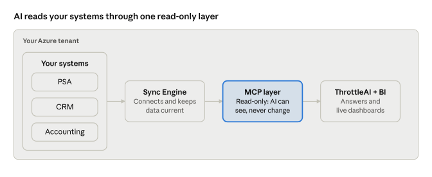
How Managed Intelligence connects · 4 parts
The Sync Engine pulls from the systems you already use and keeps that data current. The MCP layer is the only way AI reaches it, and that path only runs one direction. Everything happens inside your own Azure tenant.
A Window, not a Door
Connecting AI to your business raises an obvious question: what stops it from changing things it should not? Deleting a record, editing an invoice, or sending something to a client by mistake.
In our architecture, the MCP layer makes your data readable to AI without making it writable. Think of it as a window into your systems rather than a door. The AI can see what is happening and tell you about it. It has no way to reach through and move anything.
In practice, that looks like this: ask which invoices are more than 30 days past due, and the AI will give you the list. It cannot mark one as paid, change an amount, or send a reminder to the client on its own. The people on your team stay in charge of every action.
That is different from a system where AI has full access and is simply told not to use it. Rules can be misconfigured or changed later. A connection that was never built to write cannot be talked into writing. We cover this in more depth in Zero-Write AI, and why the distinction matters.
And all of it runs inside the Azure environment you already control, so your data stays where it already lives.
Questions to Ask Any AI Vendor
Whether you work with us or someone else, a few simple questions will tell you a lot about how an AI tool connects to your business:
- Can the AI change data, or only read it? And if it can change data, what actually prevents it from doing so?
- Where does my data go? Does it stay in your environment, or is it copied somewhere else?
- How are new systems connected? A standard approach is easier to grow and maintain than a collection of custom integrations.
Clear answers to those questions are a good sign. Vague ones are worth a follow-up.
What This Means For You
You do not need to understand MCP to benefit from it, any more than you need to understand USB-C to charge your phone. What you need to know is simpler: your systems get connected faster, the connections are easier to maintain, and the AI can look without touching.
Want to know which of your systems we can connect, and what you would be able to ask once they are? Our free feasibility study maps it out in a written report, delivered in five business days. Or see the full picture on our MCP Architecture page.